
Razor Mode
The minimalist coding discipline that makes Krnl agents write less, ship faster, and avoid unnecessary abstraction.
What is Razor Mode?
Razor is Krnl's YAGNI-first coding philosophy, baked directly into the agent's system prompt. It follows a strict productivity ladder that biases toward minimal code, standard library reuse, and zero unnecessary abstractions. Every line that isn't written is a line that can't break.
The Productivity Ladder
Razor Mode enforces a strict order of preference when the agent chooses a solution:
Don't write code that isn't needed yet. If the task doesn't require it, leave it out.
Use existing code, patterns, and utilities already in the project before writing new code.
Prefer standard library solutions over third-party dependencies.
Use a dependency already in the project before adding a new one.
A one-liner is better than a helper function. A helper function is better than a class.
Write the shortest diff that solves the problem. No more, no less.
Three Tiers
Razor Mode has three levels, each progressively stricter about code minimalism:
Follow the ladder strictly. No new files unless the standard library can't solve it. Prefer surgical edits over rewrites.
Standard Razor discipline. Follow the ladder but allow reasonable abstractions when they clearly earn their keep.
Maximum minimalism. Prefer shell one-liners over scripts. Eliminate duplication ruthlessly. Zero boilerplate tolerance.
Using Razor Mode
Control Razor Mode from within the agent session or via the VS Code extension:
/razor             # Show current mode
/razor minimal     # Enable minimal mode
/razor ultra       # Enable ultra mode
/razor off         # Disable Razor discipline
Click the Razor mode dropdown in the extension toolbar to cycle between off, minimal, and ultra. The setting persists across sessions.
Why Razor Matters
AI coding agents naturally over-generate. They don't pay for the lines they write — but you do, in maintenance cost, cognitive load, and technical debt. Razor Mode is Krnl's answer: a simple, enforceable discipline that keeps the agent focused on what actually needs to exist. The result is smaller diffs, fewer bugs, and code that humans can still understand.
Before vs. After Razor
Consider the task: “add a simple email validation function”
# Over-engineered solution
class EmailValidator:
    def __init__(self, regex_pattern=None):
        self.pattern = regex_pattern or             r'^[a-zA-Z0-9._%+-]+@[a-zA-Z0-9.-]+\.[a-zA-Z]{2,}$'
        self.logger = logging.getLogger(__name__)

    def validate(self, email):
        if not isinstance(email, str):
            raise ValidationError("Email must be string")
        if not re.match(self.pattern, email):
            self.logger.warning(f"Invalid email: {email}")
            return False
        return True

    def batch_validate(self, emails):
        return [self.validate(e) for e in emails]
47 lines, unnecessary class, logger, batch method
# Minimal solution
import re

EMAIL_REGEX = r'^[a-zA-Z0-9._%+-]+@[a-zA-Z0-9.-]+\.[a-zA-Z]{2,}$'

def is_valid_email(email: str) -> bool:
    return isinstance(email, str) and re.match(EMAIL_REGEX, email) is not None
4 lines, uses standard library, no unnecessary abstractions
Benchmarks
Razor Mode has been tested against a no-skill baseline across multiple dimensions. The results speak for themselves — Razor(Full) achieves dramatic reductions in code output, tokens, cost, and execution time while maintaining 100% safety compliance.
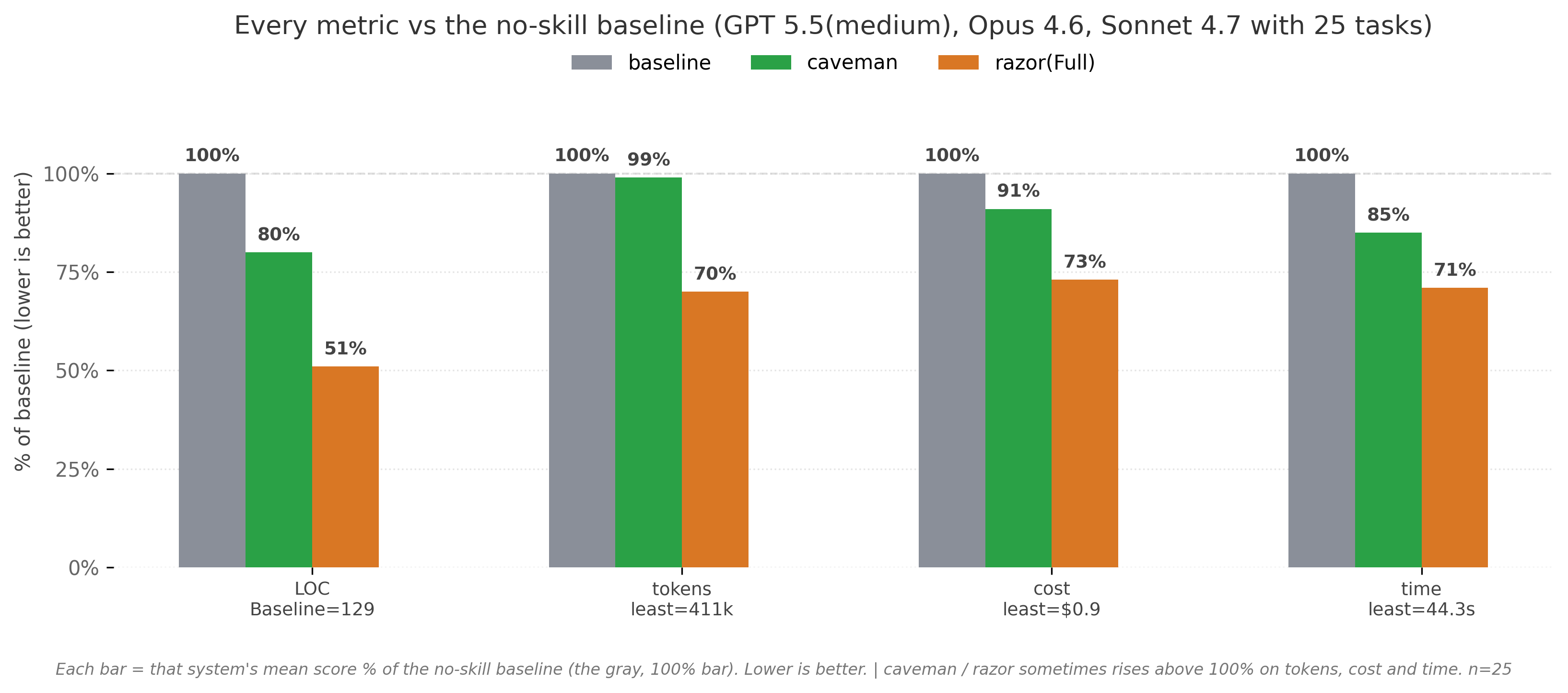
| Method | LOC | Tokens | Cost | Time | Safe |
|---|---|---|---|---|---|
| Razor(Full) | -49% | -30% | -27% | -29% | 100% |
| caveman (terse-prose control) | -20% | -1% | -9% | -15% | 100% |
| “YAGNI” prompt* | -33% | -14% | -21% | -30% | 95% |
* The “YAGNI” prompt was not included in major testing so it’s in more testing phase right now.
Data Summary
Razor(Full) (from [51, 70, 73, 71]): LOC at 51% of baseline (-49%), tokens at 70% (-30%), cost at 73% (-27%), time at 71% (-29%).
caveman (from [80, 99, 91, 85]): LOC at 80% of baseline (-20%), tokens at 99% (-1%), cost at 91% (-9%), time at 85% (-15%).